Try a Bulletin
Pick a type, report a sighting, then close it the way an officer would. These are the sample cases every new agency starts with, exactly as the app shows them. The people are made up and the pictures are illustrations.

- DOB
- 03-14-1991
- Height / Weight
- 5'11" · 185 lbs
- Hair / Eyes
- Brown / Brown
- Marks
- Tattoo, left forearm
- If Located
- Arrest on warrant
Why Active BOLO Exists
At most agencies a BOLO is an e-mail with a PDF attached. Here is what that costs on the street.
| Today, by E-mail | With Active BOLO | |
|---|---|---|
| Getting It Out | A dispatcher composes an e-mail and sends it to whoever is on duty. Minutes. | Posted once from a phone or a desk. Every officer has it in seconds. |
| Is It Still Active? | Cancellations arrive as more e-mails. Nobody knows which bulletins still stand. | Cancelled, closed or in custody updates every phone. The feed shows only what is active. |
| Three Weeks Later | Dig through the inbox. Nothing in a PDF can be searched: not the name, not the plate, not the tattoo. | Search a name, nickname, partial plate, scar or street. |
| In the Wood Line | The officer searches in the rain for a person no one has a photo of. | Dispatch pushes the photo in seconds. |
Another Tool, Not a Replacement. Active BOLO does not replace dispatch, the radio, CAD or your records system. It puts the bulletin, the photo and the map in every officer's hand and keeps them current.
See It in the App
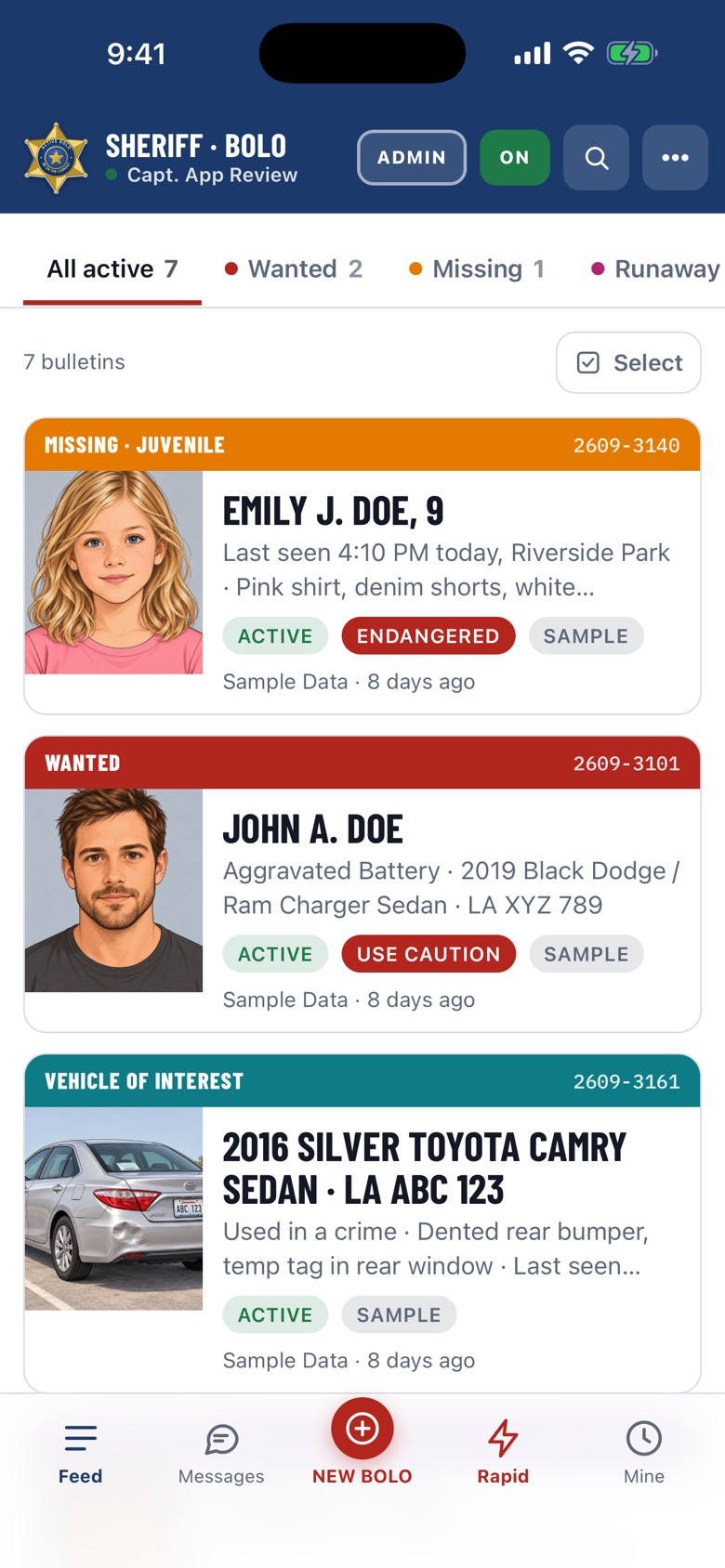
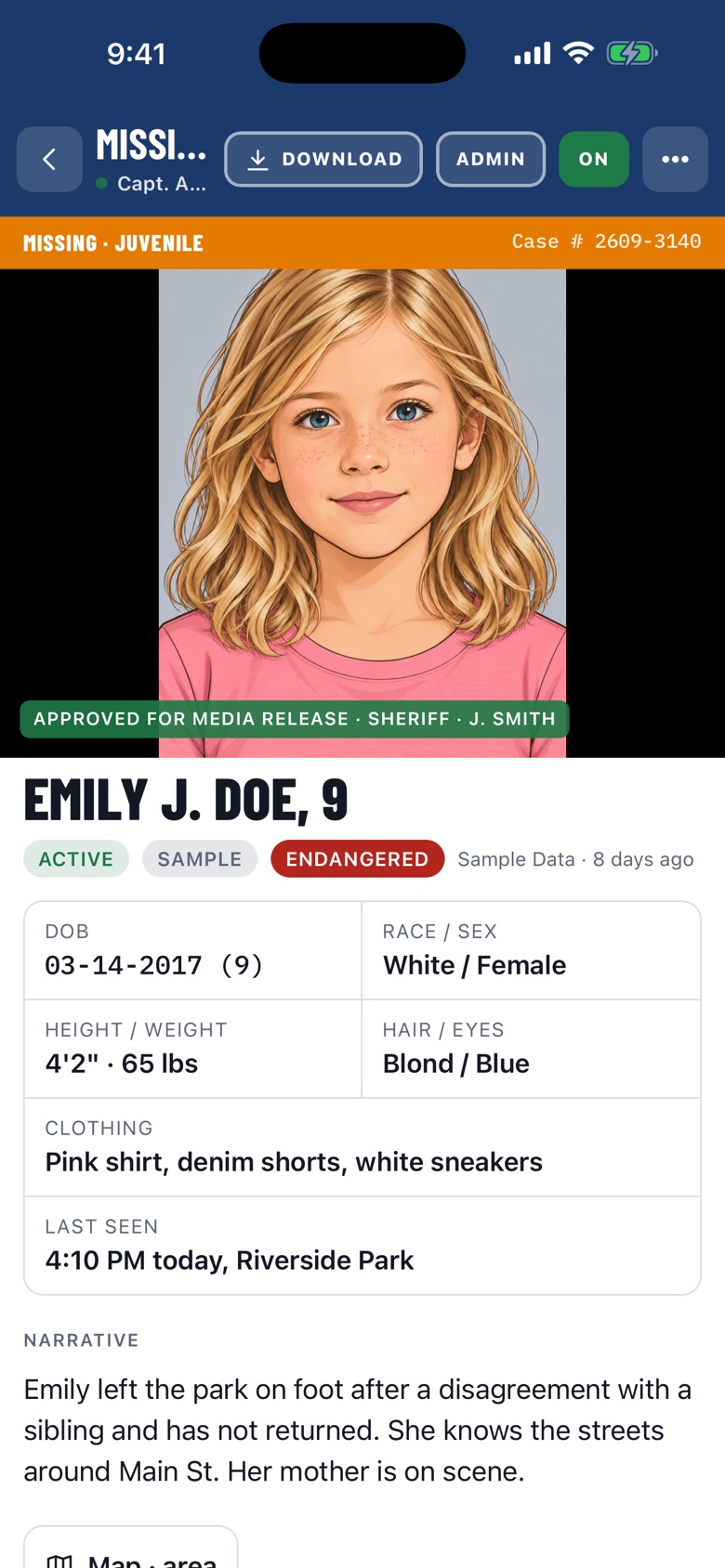
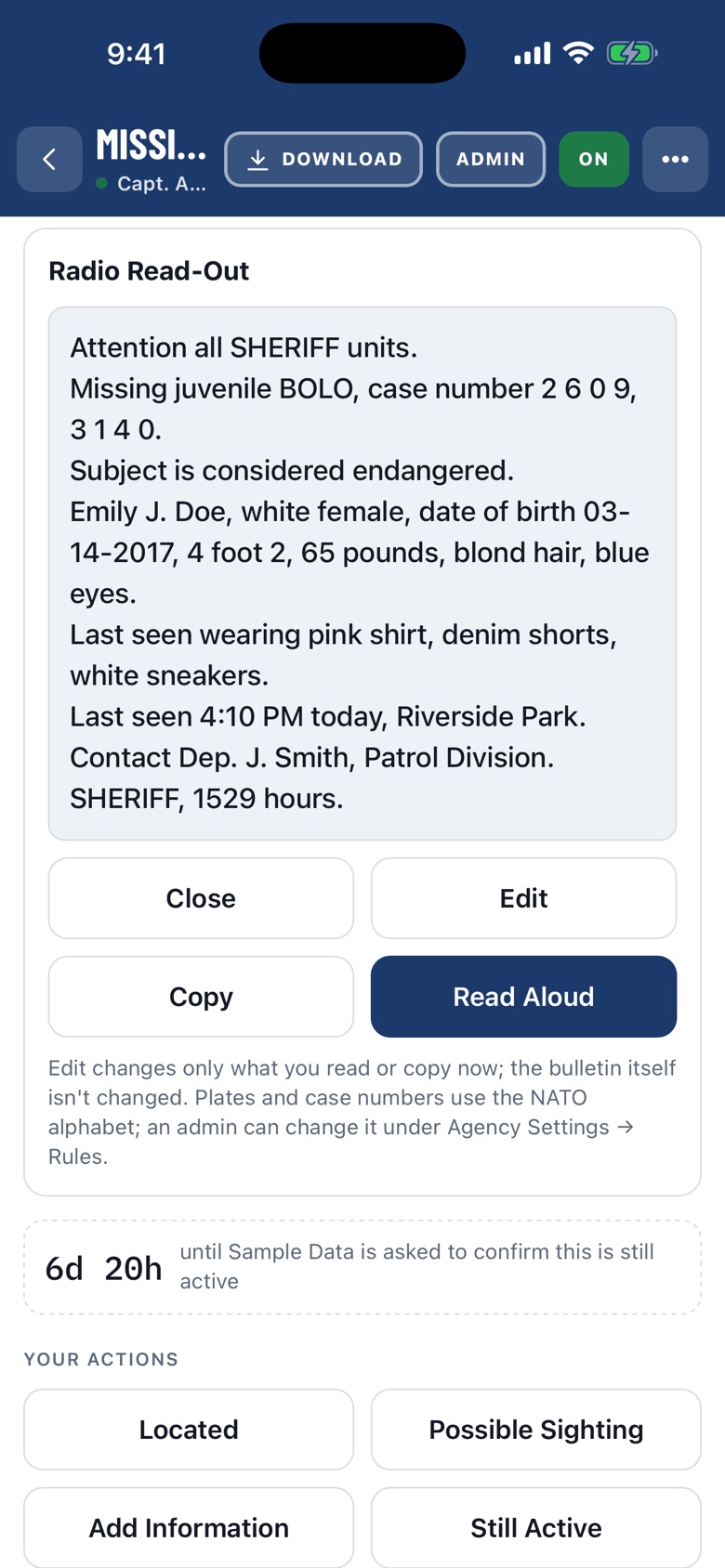
These are real screens from the Active BOLO app, signed in to the demo agency. What you see here is what your officers will see.
Roll Call and the Ops Board
For the sergeant at the podium and the dispatcher at the desk. Both screens have a kiosk mode for a wall TV or a desk monitor, with the clock in standard and military time.
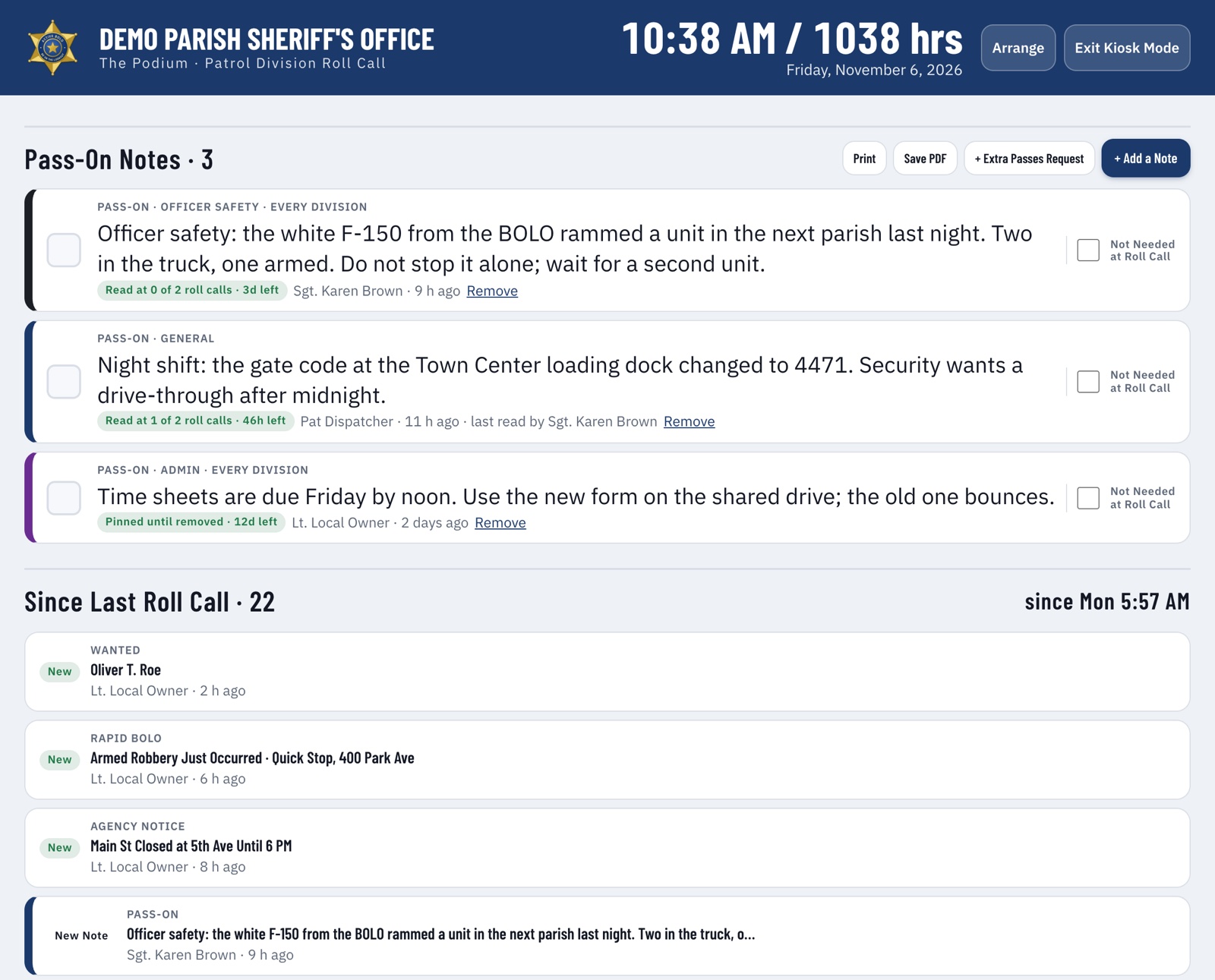
- The PodiumPass-on notes first, then officer safety, missing, wanted and extra passes. Check each line as it is read and tap BRIEFED: the agency has a record of what was read, by whom and when.
- Pass-On NotesWord for the next shift that stays until it has been read at roll call, with a hard stop so nothing lingers.
- Lineup and Who's OnThe sergeant sets the platoon, units and beats at the top of the Podium. Everyone can see who is working which beat.
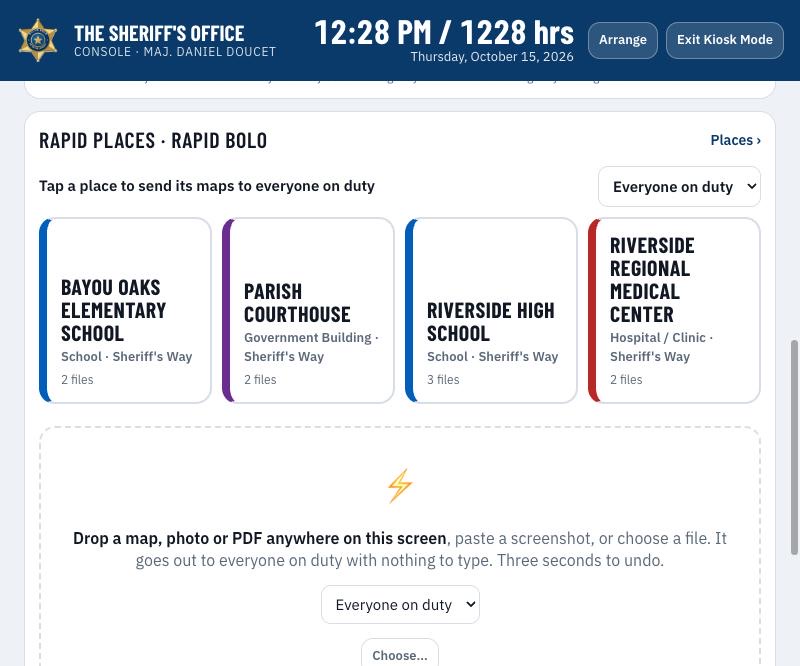
- The Ops BoardWho's On, Rapid Places, Messages with acknowledgment counts, and your own quick links. Each dispatcher arranges the screen their way.
- Rapid PlacesLoad each school's or building's floor plans, aerial and entry points once. When it matters, dispatch taps the place and every officer has the maps in seconds.
- Extra Patrol RequestsResidents ask for extra patrol from your website, with a button or a WordPress plugin. Supervisors get a push, approve it, and it becomes an Extra Passes bulletin.
Everything in the Box
Wanted, Missing, Runaway, Person of Interest, Vehicle of Interest, Stolen, Extra Passes, Rapid BOLO, Officer Safety and Agency Notices, in one app on the phone and at the desk.
On the Street
- Push, Not E-mailA full-screen alert with sound when the app is open. E-mail is only ever a copy.
- One Tap Closes the LoopIn Custody or Located notifies the poster and closes it for everyone.
- Possible SightingGPS or an address, direction of travel and how long ago. Each one drops a numbered pin on the case map.
- Radio Read-Out and Read AloudThe bulletin as a radio broadcast, with NATO or APCO phonetics. Copy it or have the phone read it out.
- Last Seen NearbyActive bulletins last seen closest to where you are standing, at the top of the feed, and a map under every photo on a desk.
- Search EverythingA name, nickname, partial plate, tattoo or street, weeks later. The same box finds people, places, settings and the instructions.
- Works Without SignalWhat is on the feed when the signal drops is what the officer has: every active bulletin with its photo and details. Sightings sent offline go out when the signal returns. Sign Out erases the copy.
- Photo DescriptionsAdd a photo and the app suggests what it sees: hair, beard, glasses, tattoos and where, clothing; a vehicle's color, damage, stickers. The officer taps the ones that are right. Search finds them. Never identity.
- Pins and SortPin the case you are working to the top of your own feed. Sort by newest, A to Z, mine first or by type.
At the Desk
- Rapid BOLONo time to type? Drop a photo, a floor plan or a PDF, or paste a screenshot. It goes to everyone on duty in seconds, with three seconds to undo.
- Dispatch UpdatesA one-line update pushed to every officer in one tap, on any bulletin.
- MessagesA message to chosen people or groups, with photos: a callout, detectives to a scene, the SWAT team. See who has acknowledged it, shift by shift.
- Agency NoticesWord to every officer at once: a tornado warning, a road closure, an emergency.
- Follow-Up TimersThe poster is asked to confirm each bulletin is still good, with supervisor escalation so nothing goes stale.
- Shift DigestAt shift change: what's active, what's new and what was resolved since your last shift.
- Officer Safety Read ReceiptsSee who has opened an Officer Safety bulletin, and who has not yet, before roll call.
- Division ReviewOnce a month, every active bulletin your division posted, one line each: keep or close. A printable sheet with sign-off lines.
- Needs ConfirmationA list of every bulletin asked three times with no answer, and a Confirm Now button on each.
- Extra Passes From the PodiumEnter a resident's request at roll call the way the resident would, and post it as Extra Passes in one go. Message a whole division at once.
Files and Paperwork
- Photos, Video, PDFs and WarrantsAttach camera photos, video clips, warrants and reports. Drag and drop or paste at the desk; the camera opens inside the app on the phone.
- Nothing in the Camera RollPhotos go straight to the server, never to the officer's camera roll. The phone keeps only a protected offline copy of the feed, erased at sign-out.
- PostersA letter- or legal-size poster with your letterhead and badge, stamped ARRESTED or FOUND when the case closes.
- Case PacketsOne PDF with the poster, every field, the map, the history, the photos and the attached warrants.
- Links That ExpireShare a poster by link. The link stops working when the case closes.
- DraftsSave a bulletin before it is ready. Only you, dispatch and supervisors see it.
Running the Agency
- Yours to RunYour badge, colors, dropdowns, RMS charge list, divisions, landmarks and retention rules. No IT project.
- Partner AgenciesShare chosen bulletins with neighboring agencies you link with.
- Outside Agency AccessView-only access for the DA's office or another partner, with an end date.
- Archive to Drive or DropboxClosed cases copied to your own Google Drive or Dropbox.
- Duty StatusOff duty means no pushes and no location, except Agency Notices.
- Secure by DesignSign-in limited to your agency's domain, two-step sign-in, roles checked on every request, a full audit trail, encrypted in transit and at rest.
- Your Own Web AddressActive BOLO at bolo.youragency.gov. Ask for the name; the records for your IT come back; it goes live on its own.
- Mailbox Sign-InConnect the agency's sending mailbox with Google or Microsoft in one sign-in. No app password.
- Welcome E-mail and Quick StartEvery officer who finishes setting up gets a welcome note with a one-page Quick Start carrying your agency's name.
- Settings That Save ThemselvesEvery Agency Settings form saves as you type, with a Save Now button for those who like to press one. Support reports reach every admin by e-mail.
For the Public
Pages your agency can put on its own website and on a flyer, add-ons you switch on when you want them. The public can send in; nothing about your cases goes back out unless a supervisor approved it.
- Citizen TipsA tip line made for phones at activebolo.com/tips/your-agency: drug activity and any other crime, anonymous if the caller likes, with photos and video from the camera. Every file is checked and its hidden location removed; only real photos and videos get in. Each category goes to the e-mails you choose, lands in a Citizen Tips inbox, and downloads as a tip packet. The tipster gets a code and PIN to check on it or prove it was theirs.
- QR Codes and FlyersEvery officer can print a flyer or hand-out cards with a QR code for your tip line, extra patrol requests or Wanted page, with their name and a case number. Leave one at the door after a call: "If you see anything, scan this."
- Request Extra PatrolA resident going out of town asks for extra patrol from your website: one button, or the WordPress plugin. The request pushes dispatch and supervisors, waits on the Podium and the Ops Board, and one tap turns it into an Extra Passes bulletin for the shift. The resident gets a reference number; nothing reaches officers until a supervisor says so.
- Wanted and Missing PageYour own page at activebolo.com/wanted/your-agency: only the bulletins marked Approved for Media Release, Missing first, then Wanted, with the poster photo and the case number. Arrests and finds show their stamp for three days, then leave on their own.
- Submit a TipEvery bulletin on the public page has a Submit a Tip button. The tip lands on the case itself, inside the app, as a history entry with the caller's name and number if they gave them; the posting officer is notified. No e-mail to sort, no call to transcribe.
- Posters and Packets by LinkShare a poster by a link that stops working when the case closes. A case packet is never shared by link.
Connect Your RMS
Let your warrant or records system post for you. When a warrant is entered, Active BOLO gets the Wanted bulletin, and the push, the poster and the case packet follow on their own. When the warrant is served or recalled, the bulletin closes on every phone.
Read the API DocsNot every RMS or warrant system can send to Active BOLO. Check with your vendor before you plan on it, or read the API documentation for what your system needs.
- Your Administrator Makes a KeyAgency Settings → Integrations. One key per system, and it can be turned off at any time.
- Your RMS Sends the WarrantOne secure call with the name, charges, warrant number, photo and narrative, in JSON or XML.
- Every Officer Has ItA full-screen alert on every on-duty phone, and the poster is ready to print. Updates and recalls arrive the same way.
Set Up in an Afternoon
Your domain, your badge, your lists. Pilots are free.
Request SetupOr E-mail hello@rouxlogic.com ·
- E-mail UsAgency name, your e-mail domain, and who your administrator will be.
- We Set You UpYour badge, Sheriff or Chief, divisions, charge list and cities, imported from your files.
- Officers Sign In With Their Agency E-mailNo accounts to hand out, and nothing to install on a computer.